As an Amazon Associate I earn from qualifying purchases. Affiliate Disclosure
A monitor arm lifts your screen off the desk, frees up space under it, and lets you set the height and angle that suit you. The catch is that an arm only works well if it matches your monitor and your desk. This guide explains what to check, then lists eight popular arms, grouped by what they are built for.
How to choose a monitor arm
Screen size
Every arm lists the screen sizes it supports, usually in inches measured diagonally. Make sure your monitor falls inside that range. Ultrawide and very large screens need an arm rated for them, not just one that can take the weight.
Monitor weight vs the arm’s load range
This is the check that matters most. Look up your monitor’s weight without its stand and compare it with the arm’s load range. Gas-spring arms are tuned for a band of weights: too heavy and the screen sinks, too light and it drifts up. Pick an arm where your monitor sits comfortably inside the range, not at the very edge. For dual arms, check the per-arm figure.
VESA mounting pattern
Most monitors have four screw holes on the back in a square pattern called VESA, commonly 75×75 mm or 100×100 mm. The arm’s mounting plate has to match. If your monitor has no VESA holes, check whether the manufacturer sells an adapter before you buy an arm.
Clamp or grommet mount
A C-clamp grips the edge of your desk, so you need a free edge and a desktop thick and sturdy enough to hold it. A grommet mount bolts through a hole in the desk, which is handy if the edge is blocked or you want the arm further back. Some arms include both options.
Single, dual or ultrawide
Single arms hold one screen. Dual arms hold two side by side from one base, which keeps a two-monitor setup tidy. Heavy-duty arms are built for large ultrawide screens that need a higher weight and size rating.
Single monitor arms
For one standard monitor. The first three are popular all-rounders; the Ergotron LX is the premium pick.

ErGear
ErGear Single Monitor Arm
- Screen size
- 13-34 in
- Load
- 4.84-19.8 lb
- VESA
- Tool-free VESA

HUANUO
HUANUO FlowLift Single Monitor Mount
- Screen size
- 13-32 in
- Load
- 4.4-19.8 lb
- VESA
- VESA
- Mount
- Clamp and grommet

WALI
WALI Adjustable Single Monitor Arm
- Screen size
- 13-34 in
- Load
- Up to 26.4 lb

Ergotron
Ergotron LX Monitor Arm
- Screen size
- Up to 34 in, flat, curved or ultrawide
- Load
- 7-25 lb
- VESA
- 75×75 / 100×100
Dual monitor arms
For two monitors from one base. Check the load figure for each arm against each of your monitors.

HUANUO
HUANUO FlowLift Dual Monitor Stand
- Screen size
- 13-32 in
- Load
- 4.4-19.8 lb per arm
- VESA
- 75×75 / 100×100
- Mount
- C-clamp and grommet

VIVO
VIVO Dual Monitor Desk Mount
- Screen size
- 13-30 in
- Load
- 22 lb per arm
Arms for ultrawide and heavy monitors
For screens larger than 34 inches. The VIVO single mount is listed for screens up to 38 inches; the HUANUO TitanLift is listed for screens up to 49 inches and up to 44 lb.

VIVO
VIVO Single Monitor Desk Mount
- Screen size
- Up to 38 in ultrawide
- Load
- 22 lb
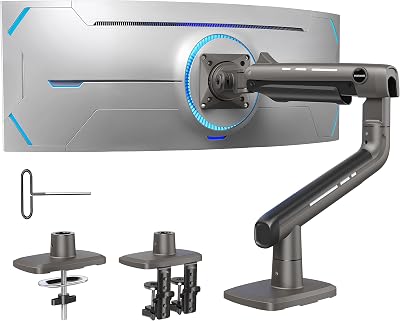
HUANUO
HUANUO TitanLift Heavy Duty Monitor Arm
- Screen size
- Up to 49 in ultrawide
- Load
- Up to 44 lb
- VESA
- Max 100×100
- Mount
- Dual C-clamp
FAQ
Will a monitor arm fit my monitor?
Check three things: your screen size is in the arm’s supported range, your monitor’s weight without its stand is inside the arm’s load range, and your monitor’s VESA pattern matches the arm’s plate.
Where do I find my monitor’s weight?
Look in the monitor’s spec sheet or manual. Use the weight without the stand, because the stand comes off when you fit an arm.
Should I use a clamp or a grommet mount?
Use a clamp if you have a free desk edge that is thick and sturdy enough. Use a grommet if your desk has a hole for one, or the edge is blocked. Some arms come with both.
Why are there no prices or ratings here?
Prices and ratings on Amazon change often, so I leave them out. Use the “Check on Amazon” button to see the current price and reviews.